The town search is not working.
Hi. I open the application. I search for where I want to go. I write a settlement: Szeged or another city. It does not show the settlements. I cannot plan a route. Please fix the error.

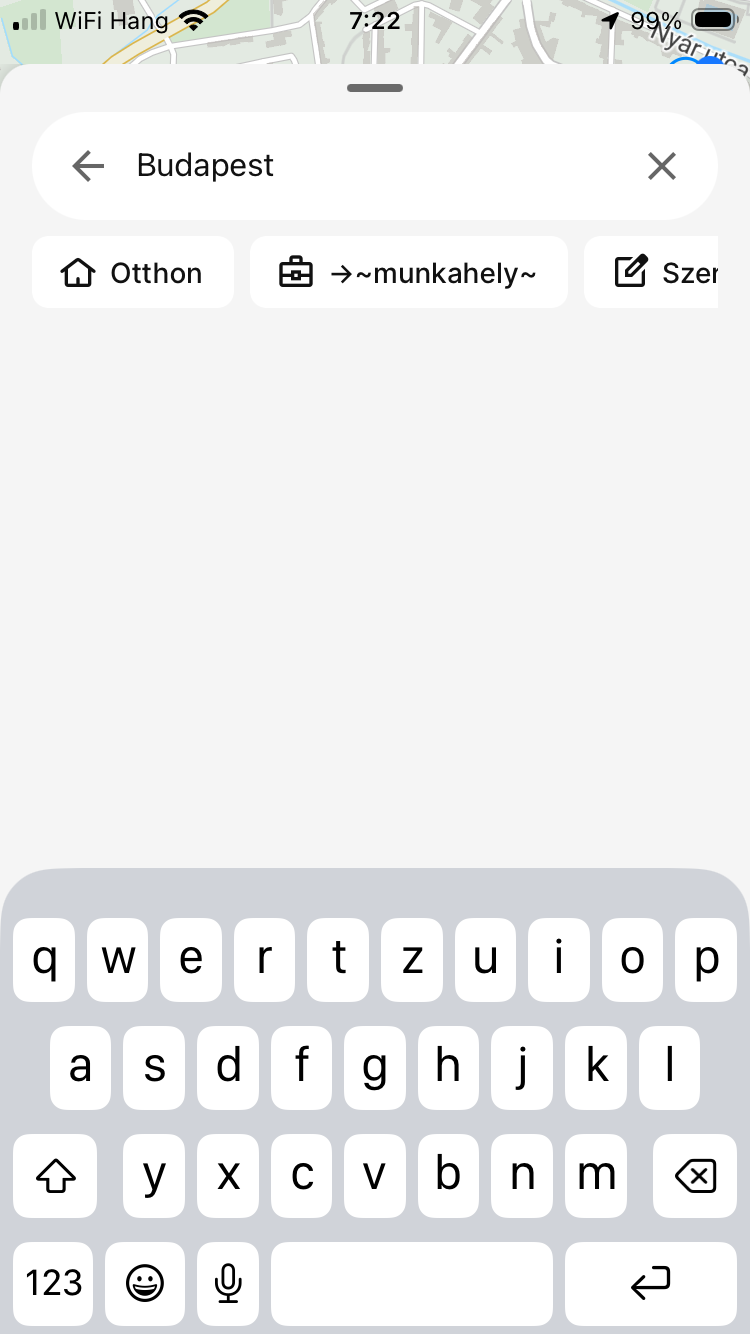
- Where does this happen?
- ABRP version number (found at bottom of settings menu)
Log in to comment and vote
Comments92
Johan (ABRP)
Aug 18
We've identified a possible cause for this issue. We were able to reproduce it with "reduced motion" turned on in your phone settings. Could you confirm whether this setting is currently active on your device? If so, try disabling it and let us know if that resolves the issue. Sorry for the inconvenience!
ABRP User #650665
Aug 18
This setting was off on my iOS. I’ve re-enabled it and the function is restored. I can use the app again. Thank you!
ABRP User #2522445
Aug 18
Thanks Johan, indeed, deactivating this setting makes ABRP function again for me. Thanks again.
Johan (ABRP)
Aug 18
That's pretty conclusive, thanks for confirming! We're working on a fix so you can enable it again, and we'll release it as soon as possible.
ABRP User #1876010
Aug 12
For me as well.
Since the recent update, I cannot search destinations. It just hangs at the text entry box, when you hit enter. No destination/address suggestions come up.
If you have it as a saved (favorite) destination, then the navigation works as it should.
I have tried force closing the app, resetting the phone, reinstalling the app. Nothing seems to fix it.
I am on IOS 26.6. App version 7.1.5
ABRP User #374756
Aug 12
Search is not working after the update.
ABRP User #2433395
Aug 12
Search not working for me too
ABRP User #1979719
Aug 13
I posted this yesterday as a bug but no-one appears to have looked at it yet:
The card that appears if clicking on a charger rapidly flickers.
Location search doesn’t work at all and the navigation card flickers.
Logging out of my account causes no cards to appear at all, so no location search, no charger or car details.
Have tried uninstalling and reinstalling the app. Turning my iPhone off and on. Logging out of and into my account. Tried the above in airplane mode too to see if my account would refresh on app startup.
App no longer functional.
All after updating to the latest version.
ABRP User #2981211
Aug 15
I've done everything I can. I've downloaded the application again, I've looked at my localisation settings but everything is still the same and it won't let me
ABRP User #1154243
Aug 17
I’m using an iPhone with the latest iOS version. In the ABRP app, when I go to search for a destination, no suggestions appear below the search field. Expected results: a list of destination suggestions should appear as I type, like before. Actual results: no suggestions appear, so it’s impossible to select a destination.
ABRP User #314097
Aug 18
Me too, only by first adding locations to favorites makes the app work
ABRP User #1979719
Aug 18
Yes. Turning reduced motion to off fixes the bugs, both address searching and screen flickering. Hopefully the next update of ABRP allows it to be turned on again.
Linda ABRP
Aug 12
Hi
Do you allow the app to see your position?
Can you try to kill the app (swipe up) and start it again.
ABRP User #1210105
Aug 12
I have exactly the same issue. I closed the app, restarted my iPhone, checked the location permissions, and reinstalled the app. The history is gone as well. Everything happened after the update. I don’t know why there’s always something new going wrong.
Linda ABRP
Aug 12
Thanks. We will look at this at our bug meeting today.
ABRP User #1594133
Aug 16
Search working on Ipad but not working on iPhone
ABRP User #1273424
Aug 12
hi. I restarted the program. I restarted the phone. I deleted the program. I reinstalled the program. My position is accurate. I can't search for settlements. I can't plan a route like this,
Linda ABRP
Aug 12
Thanks. We will look at this at our bug meeting today.
ABRP User #1273424
Aug 12
forgot to write. Phone: IPhone SE 2020
ABRP User #374756
Aug 12
Exactly this happened to me too. I phone 16 Pro Max IOS 26.6
Jim Verdin
Aug 17
My experience as well on my iphone. Very frustrating.
ABRP on my laptop is fine.