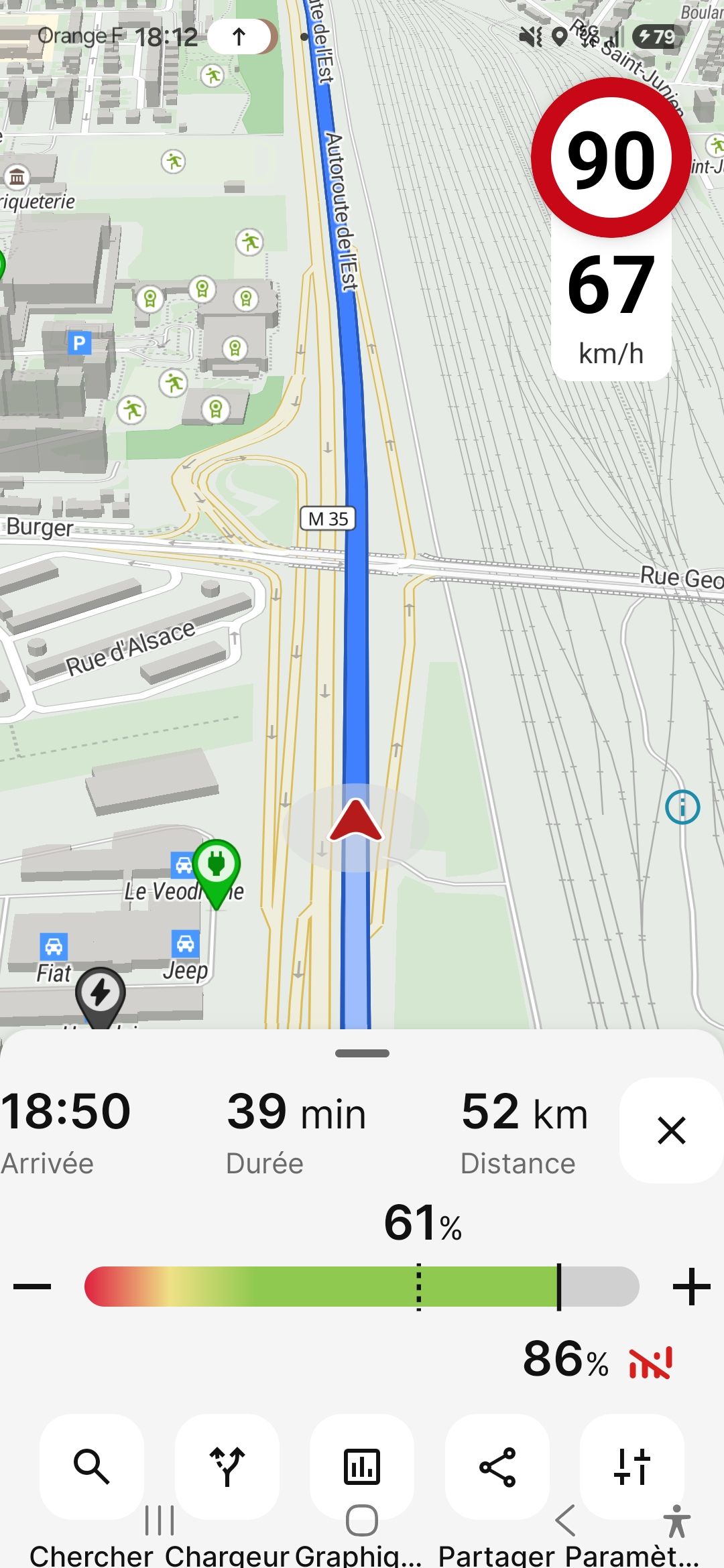
Buttons at screen edges are difficult to tap
The X, +, and − buttons are very difficult to press because they are positioned too close to the edge of the screen. When I try to tap one of these buttons, Android often interprets my finger movement as a gesture to drag or swipe the bottom panel instead of a button press. As a result, it frequently takes several attempts before the button is actually activated. Moving these buttons slightly further away from the screen edge, or increasing their effective touch area, would greatly improve usability. Device used: Samsung Galaxy S25 (Android 16)
- Where does this happen?
- ABRP version number (found at bottom of settings menu)
Log in to comment and vote
Comments4
Samuel_ABRP
Jul 31
Hey, sorry for that, looks like the padding got lost along the way. This is already fixed with the latest beta. Installing the ABRP Beta version
Please check if it works better there.
ABRP User #2968156
Jul 29
•Merged request
•1 vote
Navigation summary clips arrival time against left edge
While navigating, the elements at the top of the bottom sheet to have no visible padding on the x-axis.
Linda ABRP
Jul 29
Hi
We are aware of this and it’s fixed and will be out in the next release.
Linda ABRP
Jul 22
Hi
Thanks for reporting this. I have sent it to our developers.