[Web] Switching cars for the same trip planning uses the first used car to plan the trip
This is happening now on the web page. I’m not sure about AA.
I have on my account two cars:
Hyundai Kona 2019 64 kWh
XPeng P7+
When I start planning a trip (in my case somewhere around Bastogne), I have had the XPeng P7+ selected as my car of choice.
The plan looks like this:
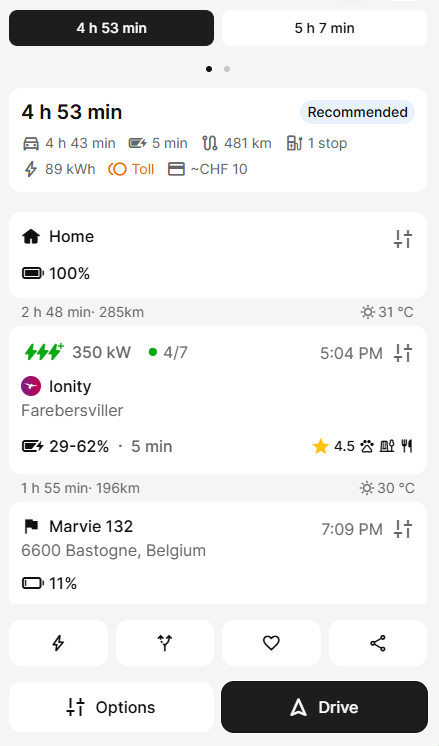
Then, I was curious how much time do I save when using my Kona?
Well, it turns out that it is the same, exact plan being shown, like the car change never happened!
Furthermore, when I look at the list of cars, although the car that was chosen is my Kona, the selected one in the list is still XPeng:
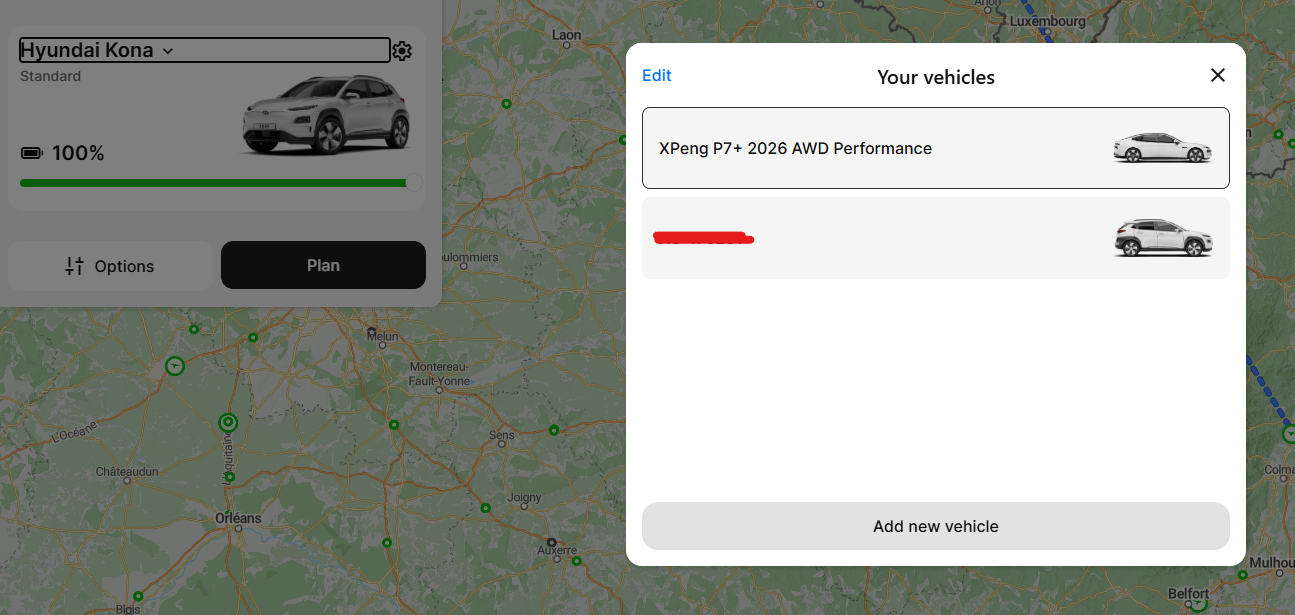
Could you please address this issue?
- Where does this happen?
- ABRP version number (found at bottom of settings menu)
Log in to comment and vote
Comments2
Aug 11
PinnedHello @ABRP User #141116,
In order to look into this, we would need consent to access your account. If you do consent to this, then you can accept it through the following link: https://accounts.abetterrouteplanner.com/portal/support-access
ABRP User #141116
Aug 11
Hello team,
I have just hard refreshed the page (Ctrl + Shift + R) and the reported bug seems to not happen, for now.
While this is not the first time this happens for me, I’m curious if there are any leftover script files from previous versions around, although the version was copy-pasted using the copy icon, assumingly it’s the latest