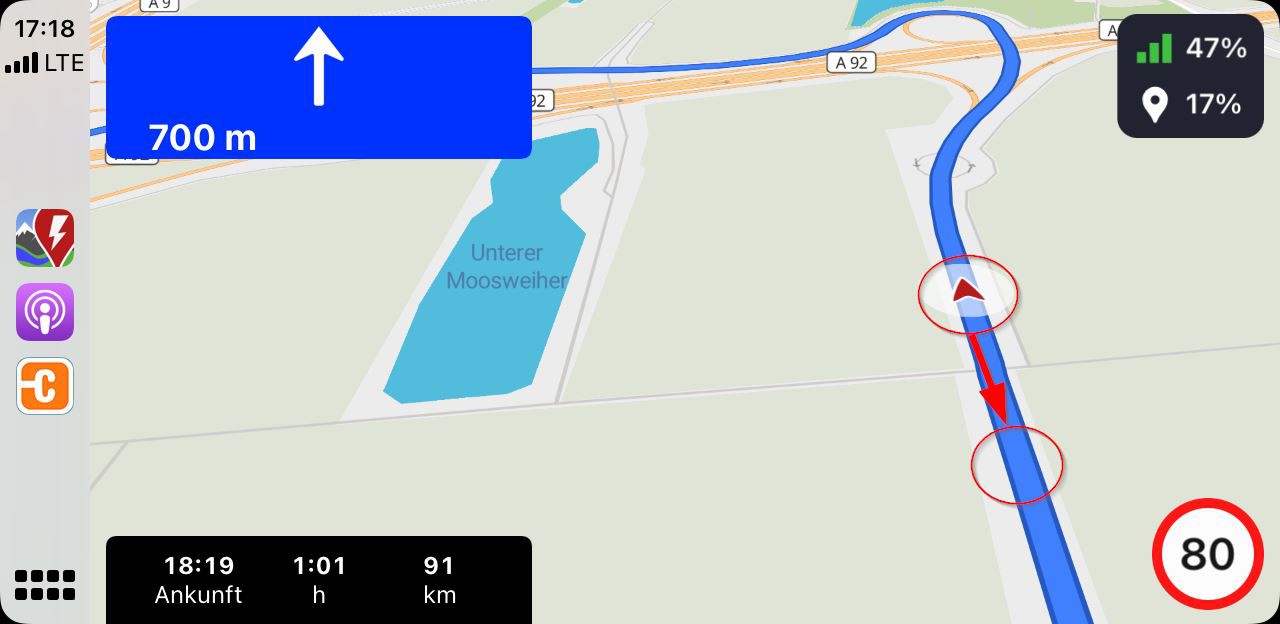
The current vehicle position is displayed too high on the map with CarPlay
🚧 THIS IS A TICKET MIGRATED FROM UPVOTY. The original ticket and comments will be available for a limited time over at:
https://abrp.upvoty.com/b/report-a-bug/the-current-vehicle-position-is-displayed-too-high-on-the-map-with-carplay/
———————————————————————————
ARBP 4.2.0 with CarPlay and iPhone 11 Pro iOS 15.4
The current vehicle position is displayed too high on the map with CarPlay.
It is not interesting to see what was in the past on the map, but to see what will happen in the near future.
Therefore the vehicle position (calculated from below) should be displayed at about 20 to 30% of the screen height, as it was in before V4.2.0.
ABRP V4.7.2 (2572)
iPhone 12 Pro iOS 17.2.1
In the 3D view you now have a better overview of the route ahead as the viewing angle is now flatter.
This is an improvement, especially in the city area.
Status: Completed
Log in to comment and vote
No comments yet
Be the first to share your thoughts.