SOC on MG Cyberster incorrect
Connection to bluetooth dongle works.
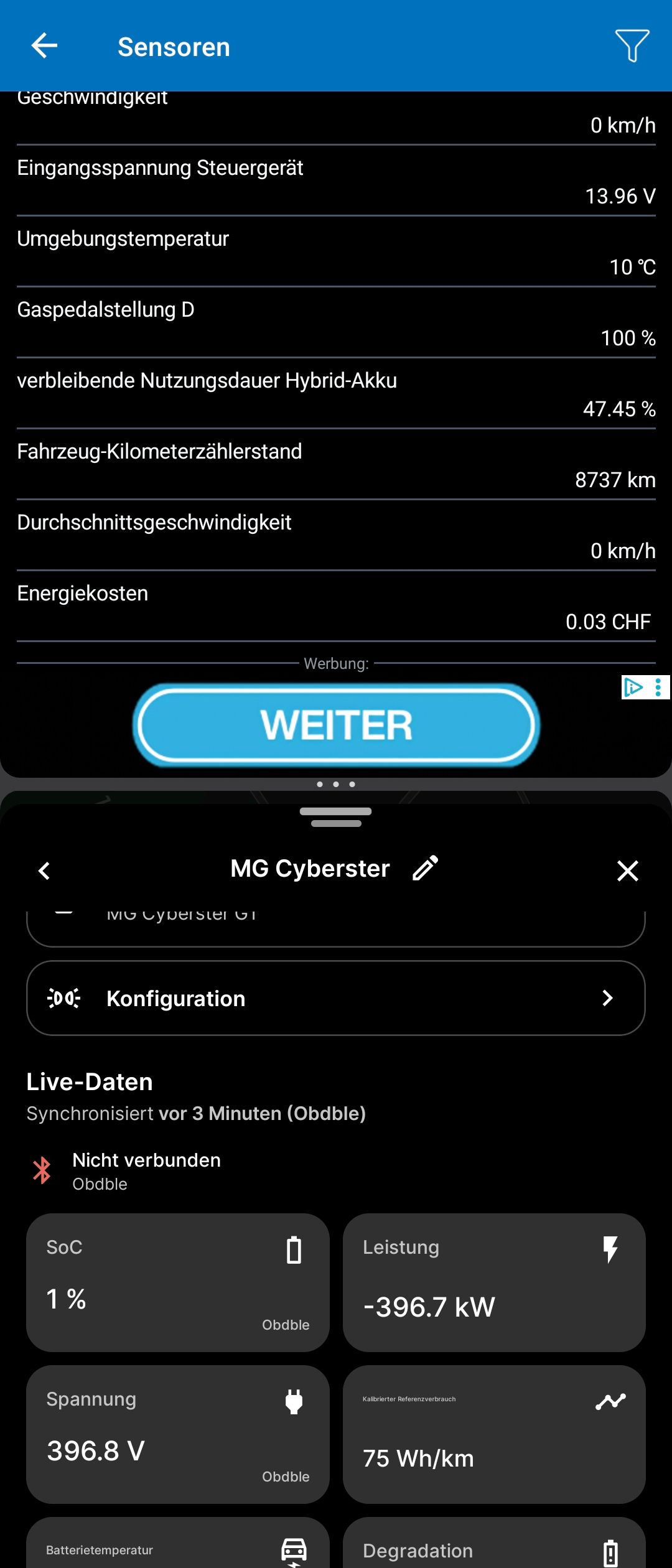
In another app, I see wx.yz %.
ABPR shows the minimum value only. Suspected by division by 100? Changing this by multiplying the formula and other ideas do not help.
Screenshot:
Top: correct value
Bottom: wrong value, probably the minimum
- Where does this happen?
- ABRP version number (found at bottom of settings menu)
Log in to comment and vote
Comments11
Linda ABRP
Dec 11, 2025
Hi
What kind of OBD do you use?
To help us figure out what happen we need you to send a bug report. First you need to enable the bug button in the settings. Go to the settings and scroll all the way down.
The bug button will show on your screen. When the OBD is connected to your car and the car is in drive mode click at the button. Then let me know when you have done this.
Even Meier
Dec 15, 2025
Report sent, today, 19.36 CET.
Even after multiplying SOC_bms by 100 or 10’000
Linda ABRP
Dec 16, 2025
Which OBD do you use and what was the real SoC when you got 1% in our app?
Even Meier
Dec 16, 2025
See screenshot: On top, you see the SOC of 47.45 % in another app, on bottom, you see the 1 % in ABRP.
The 47.45 % was shown exactly on the cars display. Otherwise, I’d never dared to bother you (:
My tool is a bluetooth OBD2-dongle, ELM 327.
Linda ABRP
Dec 16, 2025
It could be that we have the wrong pids for the car. We don’t have the time to figure it out so you need to use the carscanner to figure out what the problem is or find other pids online.
It can also be a problems with the OBD even if it shows numbers in the other app. You can read here which OBDs we know that works with our app Link your vehicle via an OBD device
Even Meier
Dec 17, 2025
With the help of some AI, I’ve tested a lot.
Here is a summary:
MG Cyberster – SoC via OBD
Car Scanner shows correct, stable SoC.
ABRP always shows ~1%.
Manual terminal tests:
Same response for all headers (781, 7E4–7E7), always via gateway (7EB/7ED).
00A3= ~1.6%, explains constant ~1%.Conclusion:
22B046is not BMS SoC on MG Cyberster via OBD.Gateway blocks/proxies BMS access; Car Scanner uses a non-standard path.
Even Meier
Dec 17, 2025
PS: The link provided always returns to this comment :D
Even Meier
Dec 19, 2025
MG4 Long Range uses SoC source 015B (virtual/derived) and works correctly.
Cyberster uses direct BMS SoC via 22B046, which is blocked by the gateway and returns ~1%.
Cyberster likely needs the same virtual SoC approach as MG4.
Even Meier
Dec 16, 2025
See screenshot: On top, you see the SOC of 47.45 % in another app, on bottom, you see the 1 % in ABRP.
The 47.45 % was shown exactly on the cars display. Otherwise, I’d never dared to bother you (:
My tool is a bluetooth OBD2-dongle, ELM 327.
Even Meier
Dec 19, 2025
Here is a solution.
I dared to change the car profile from
MG Cyberster
to
MG4 …
And it works.
MG4 Long Range uses SoC source 015B (virtual/derived) and works correctly.
Cyberster uses direct BMS SoC via 22B046, which is blocked by the gateway and returns ~1%.
Cyberster likely needs the same virtual SoC approach as MG4.
Samuel_ABRP
Oct 17
Should be fixed now