Linking vehicle via OBD in 7.0.2 (5764) broken
No OBD menu in ABRP - Therefore, no possibility to connect a compatible dongle.
Hello, everyone.
I am an ABRP Premium subscriber and I use this app regularly with my R5 ETech.
Until now, I have been using live OTA data via Enode to get my battery charge in the app.
However, I purchased an OBD dongle so that I could get more information and, above all, more responsiveness on the car data in ABRP.
But I am facing a very mysterious problem.
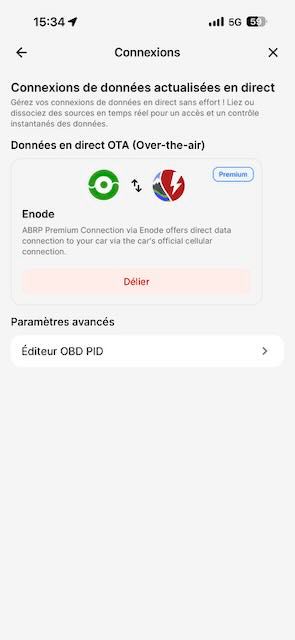
I no longer have the menu for connecting a dongle in the "Connections" menu of the app.
I only have Live Data (OTA) and below that "Advanced Settings" with a submenu called "OBD PID Editor."
Nothing else.
As a result, I can't connect my dongle (OBDLink CX) to the app.
Could someone please explain what is happening?
I should point out that:
- The dongle is one of those recommended by ABRP
- I restarted the app
- I restarted my phone (iPhone 17 Pro Max)
- I uninstalled and reinstalled the application
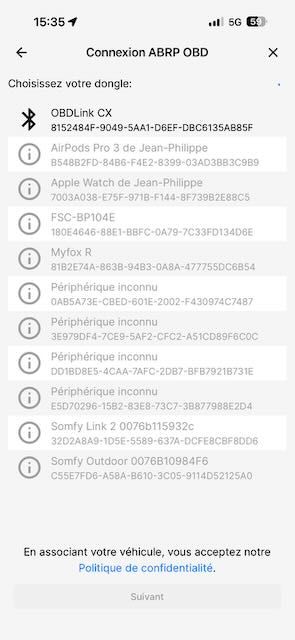
If I run a PID test in the OBD PID editor, ABRP first asks me to connect to a Dongle.
In this case, it manages to do so and I can run my test, which shows that the Dongle is working.
However, once the test is complete, it does not remain connected to ABRP, and I am back to square one, unable to perform the test.
Attached is a screenshot of my connection menu in ABRP and a screenshot of the connection to the Dongle, as part of a PID test.
- Where does this happen?
- ABRP version number (found at bottom of settings menu)
Log in to comment and vote
Comments5
Feb 25
PinnedHi all,
This has been corrected in version 7.0.2 (5774)
Kill the app and start it again to force the update.
Jean-Philippe GUILBOT
Feb 26
Merci. Je testerai donc mon Dongle OBD lors de mon prochain trajet.
J’en profite pour dire tout le bien que je pense de la nouvelle ergonomie de ABRP. Les menus sont plus clairs, plus pratiques, sans sacrifier les multiples fonctionnalités de l’application. 👍
Katya S.
Feb 26
Thank you greatly for the positive feedback! I’ve shared this with the team :)
Feb 25
PinnedHi @Jean-Philippe GUILBOT,
Thank you for reaching out to report this. I can see that this is broken.
We’ll deliver a fix for this soon.
Jean-Philippe GUILBOT
Feb 25
Merci pour cette information. J’espère que ce bug sera rapidement résolu, ayant un long trajet à effectuer lundi 2 mars. 😊