Missing Waypoint Name In Next Stop Tile
I’m out running errands with five stops to go, notice that the “next stop” tile in the upper light is not showing a destination. I’m not sure if this is a long standing bug that I just haven’t noticed before, or if it is new in 3555.
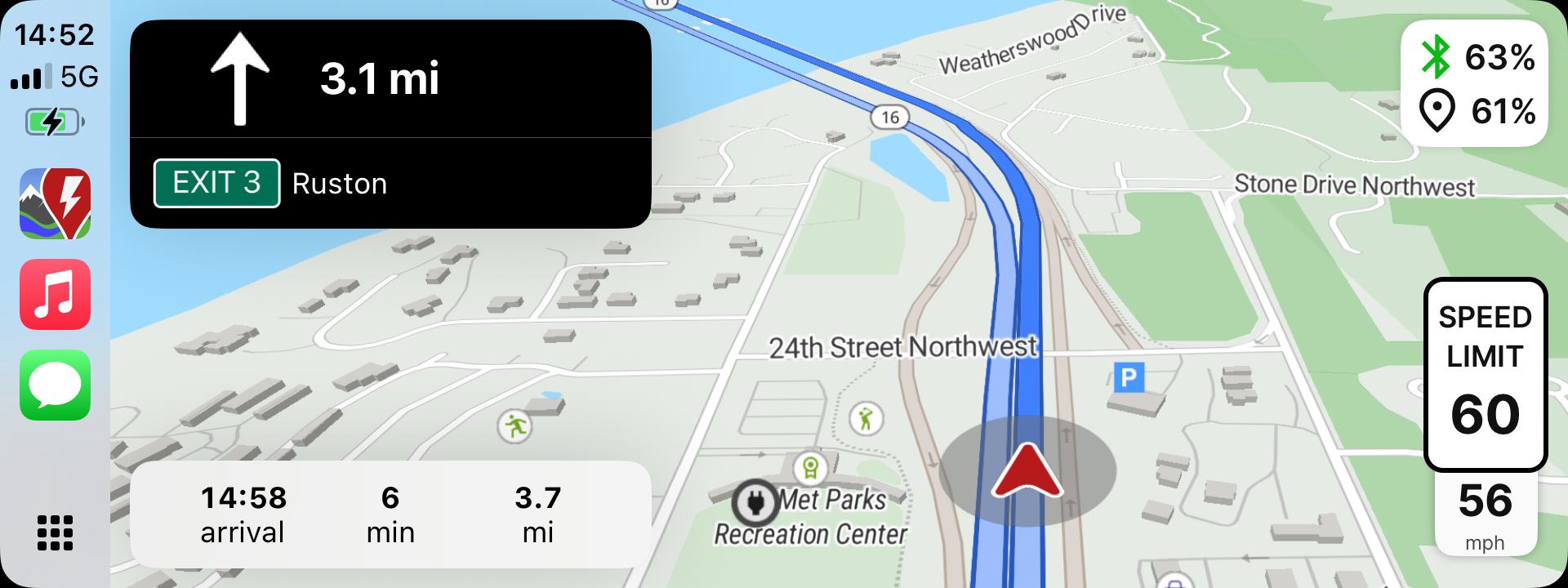
- Where does this happen?
- ABRP version number (found at bottom of settings menu)
Log in to comment and vote
Comments17
Linda ABRP
Sep 17, 2025
Hi
There is a 3559 out, 3555 is beta. Can you please see if the issue is still there?
ABRP User #811399
Sep 17, 2025
Sure! Thanks.
ABRP User #811399
Sep 17, 2025
Is 3559 the released build for 6.1.4? Do they appear in TestFlight or are the TestFlight releases strictly betas?
Linda ABRP
Sep 17, 2025
I saw now that 6.1.5 (3558) is the latest in Testflight. That is not a beta version.
ABRP User #811399
Sep 17, 2025
Should I test it against 3558? Happy to do that.
Linda ABRP
Sep 18, 2025
Yes that would be great.
ABRP User #811399
Sep 18, 2025
I tried to install 3558, but the latest that I see in TestFlight is still 3555. Am I missing something or has 3558 not been pushed out yet?
Linda ABRP
Sep 19, 2025
Sorry. You need to test outside Testflight to not have a beta version.
ABRP User #811399
Sep 19, 2025
I tried that. What I get from Apple’s App Store is 6.1.4 (3556).
Linda ABRP
Sep 19, 2025
Ok then it’s the latest that is our for users. Did it work better than the beta version?
ABRP User #811399
Sep 19, 2025
I didn’t try it because I was looking for 3.5.5.8, but I can today. I’ve just reinstalled the production version (3.5.5.6).
ABRP User #811399
Sep 21, 2025
The issue was still there in 6.1.4 (3556). It was worse than I thought — the next stop info was missing on multi-stop strips and also if you were going directly to a single destination. I see that I have 3559 on my phone now. I’ll see if I can test with that today. I’ll also check to see if the next stop information is there if there is a charging stop planned. All of the testing that I’ve been doing has been on trips that don’t involve a charging stop.
Bo (ABRP)
Sep 22, 2025
To show the next waypoint name in the top right, you need to go to Settings→Map&Display→Show charging stop name on battery status indicator (sic) - is that what you need here?
ABRP User #811399
Sep 22, 2025
Hmm, on the iPhone, starting from the “hamburger” (three horizontal bars) menu in the upper left, I see Settings > Maps which gives me the options of “Map type” and “Map follows theme.” I don’t see the option to “Show charging stop name on battery status indicator.” But I also can’t find the option to change the trip estimates for destination to next stop. I think I must be looking in the wrong place.
Bo (ABRP)
Sep 22, 2025
Sorry, I meant the ABRP CarPlay settings on the CarPlay top right bar.
ABRP User #811399
Sep 22, 2025
Ah! That’s why I can’t find it while I’m sitting in the doctor’s office :-)
I didn’t turn it off on purpose, I’ll check on the way home.
ABRP User #811399
Sep 22, 2025
That was it. Sorry for the false alarm.