Loading saved plan show "My position" for all waypoints
Using ABPR version 5.6.0 (3194) on Windows 11 and When loading a saved plan in either Chrome or using the ABPR app on a Google Pixel device, the waypoints all show as “My Position”, however, if I go in and edit the plan, the waypoints show up in the plan edit screen.
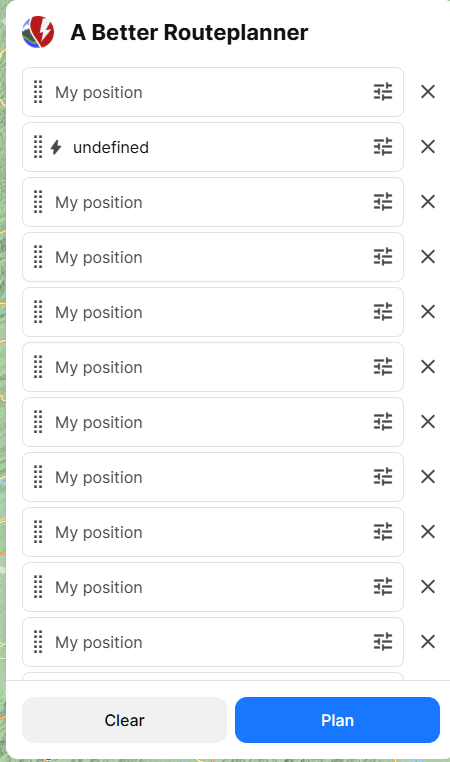
- Where does this happen?
Log in to comment and vote
Comments6
Michael Kearnes
Jan 15, 2025
I was able to recover the waypoints by saving the plan to a spreadsheet and then manually re-adding the waypoints and then saving the plan as a new plan.
I would like to know what happened to cause all of the waypoints to show as “My position” in the plan display, so that I can avoid whatever I did to cause that.
Thank you!
Katya S.
Jan 15, 2025
Hi @Michael Kearnes,
Is this an old plan you’re trying to open? Does the same happen if you save a new plan and open it?
Michael Kearnes
Jan 15, 2025
It appears to only happen with older plans. The plan I loaded was from August of 2024 (about 5 months ago). I noticed this issue in December, but didn’t have time to investigate it until now.
Loading an old plan and then running the planner shows the route correctly on the map, but the waypoints are unnamed.
If I create a new plan and save it, then the waypoints show correctly.
I tried loading an old plan (destinations only) and then saving it to a new plan, but that didn’t work.
Is there a way to recover the waypoints from an old plan (save it to a file) and then reload it so that it will add the waypoints back in?
Katya S.
Jan 21, 2025
Then it has most likely been anonymized. Though we shouldn’t say ‘my position’ usually an anonymized plans waypoints would say ‘somewhere along the way’.