Lexus RZ 350e 2026 enode not working.
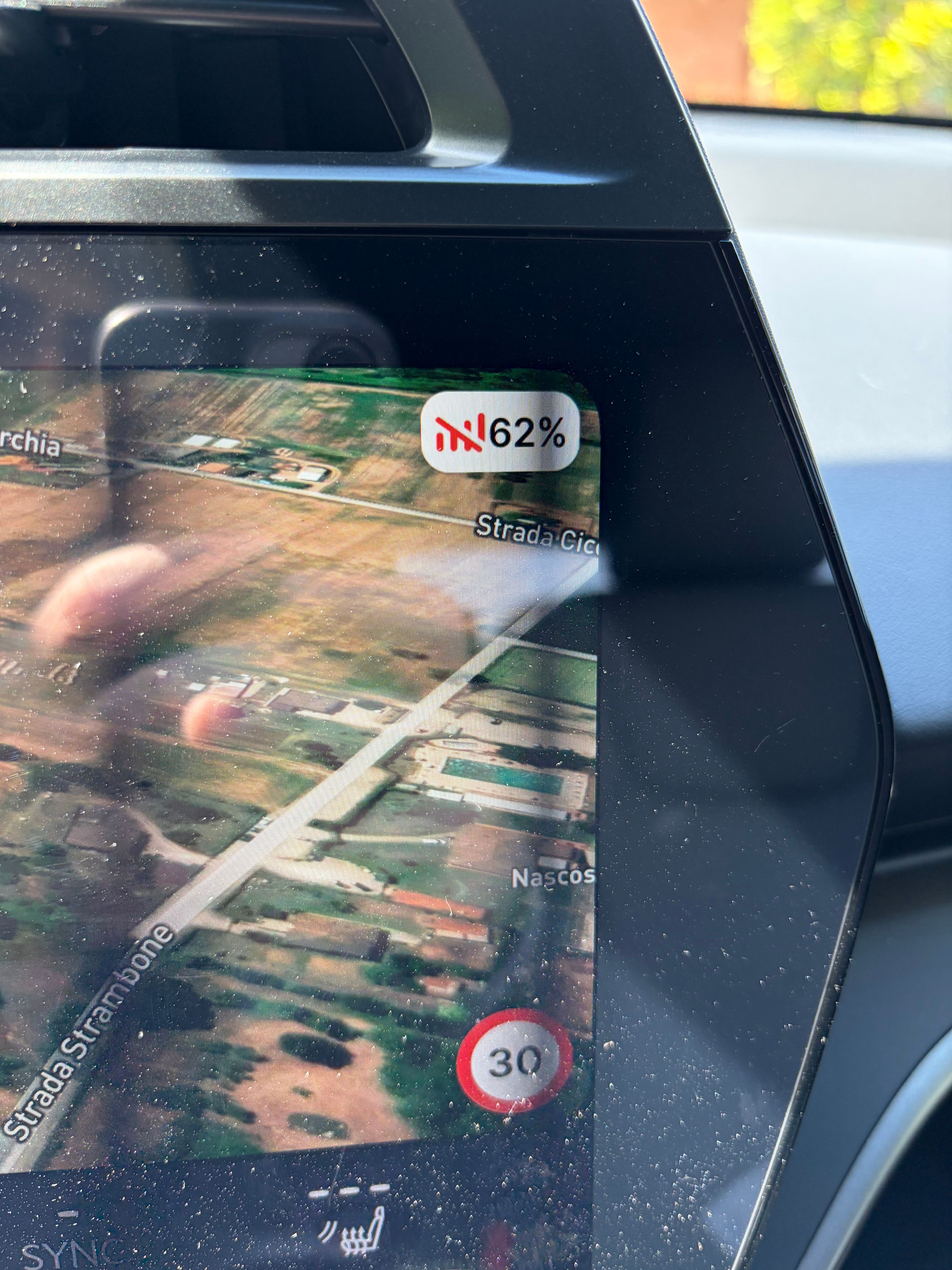
ABRP keeps showing the red "no connection" icon next to the SoC on the map (see attached screenshot), even though the Enode integration is listed as connected in the app and Lexus Link works correctly on my phone with live data.
Details:
Vehicle: Lexus RZ 350e (MY26)
Provider: Enode / Lexus Link
ABRP version: 7.1.1 (5870), iOS
The SoC value appears not to update in real time, so the integration looks broken on the backend side. Could you check whether telemetry is actually reaching ABRP from my Enode-linked vehicle?
Thanks,
- Where does this happen?
- ABRP version number (found at bottom of settings menu)
Log in to comment and vote
Comments13
Linda ABRP
May 25
Hi
Thanks for reporting this. I have sent a report to Enode and I will get back to you as soon as I hear from them.
ABRP User #1724861
May 26
When will ODB Connection be available for this vehicle?? The vehicle is listed for setup but will not connect to the ODB Bluetooth dongle. Enode is NOT reliable.
Linda ABRP
May 27
I think that OBD is supported for your car. When you click at Connect with live data is there a OBD connection button? You also need to use an OBD that use BLE Choosing an OBD device
ABRP User #1724861
May 29
I have purchased an ODBLink CX which was recommended by ABRP. I see that my particular vehicle is loaded but the OBD connection fails every time. I did not experience this much difficulty with my 2024 Toyota bZ4x. It worked right away with that vehicle. This 2026 Lexus with ABRP has been a completely different story. Very frustrating. I have attached my screenshots of the progress when attempting to connect. Need some help with this. I don’t pay a subscription fee for nothing.
Linda ABRP
May 29
To help us figure out what happens we need you to send a bug report. First you need to enable the bug button in the settings. Go to the settings → Display & appearance and scroll all the way down.
The bug button will show on your screen. When the OBD is connected to your car and the car is in drive mode click at the button. Then let me know when you have done this.
ABRP User #1724861
May 29
I have done this already and when I’m driving with the dongle attached to the ODB port which will NOT successfully connect through the app as I have already informed you. When I hit the bug button, a small white window at the bottom appears and then disappears with no file, next steps, or function. I have no idea what you need or how to get it. ABRP knows this doesn’t work for this model but for some reason cannot fix it.
ABRP User #1724861
May 29
I have been trying to connect with any Toyota family made vehicles from older to all newer models and none work. I WAS successful connecting with the Subaru Solterra, latest model AWD but it does not reflect SoC correctly nor is the kWh battery size the same but it does connect with the 2026 Lexus RZ350e Premium. However, once connected, it does not update as the battery degrades and I get a message that the ODB connection is not updated.
Can this assist ABRP in some way to help with the many problems you are having with many customers?
Pierluigi
May 29
Hi,
I am following up on the issue reported regarding Enode and ABRP. Are there any updates or fixes available yet?
Best.
Linda ABRP
Jun 1
No it’s not fixed yet.
Pierluigi
Jun 2
Hi,
do you suggest to use obdlink cx instead? Maybe with the bz4x profile ?
Best.
ABRP User #1724861
May 26
I also have a 2026 Lexus RZ350e Premium and have had to resolve to use Enode since the ODB Connection will not function AT ALL. I too have clunky Enode operation.
Linda ABRP
Jun 3
I got this from Enode:
“What you are seeing is the known Toyota/Lexus data freshness limitation. The cause sits on the vendor side. We poll the Lexus backend frequently (roughly every few minutes), but their backend often returns a cached reading rather than a live one, including while the vehicle is being driven. The car only transmits fresh data on specific events such as ignition-off, opening the Lexus Link app, or a sent command, so during active use the state of charge and its "last updated" timestamp can stay frozen across many polls and then jump in one step once the vehicle next reports. This is why the Lexus Link app can look live while the integration appears stale: the app wakes the car on demand each time it is opened, whereas our background polling cannot wake it on every cycle without draining the 12V battery.
One thing worth noting: during this period the connection for this vehicle was disconnected and re-linked several times. That is not necessary here, since the link was healthy throughout. Each re-link also issues a new vehicle ID, and if ABRP briefly holds the previous ID during a swap it can show "no connection" until the new ID syncs. I would suggest leaving the vehicle linked rather than reconnecting it.”
Since it’s a known problem from Lexus we can only change when we show the red bar symbol and also change it to something else. We need to look at this and how we can
present it better.
Pierluigi
Jun 7
Hi ABRP team,
Flagging a vehicle-profile issue on the 2026 Lexus RZ and Toyota bZ (shared e-TNGA platform).
On these MY2026 cars the OBD live-data link doesn't work. The native RZ profile offers no option to connect an OBD adapter, and the old workaround of selecting the Toyota bZ4X profile — which worked on pre-MY26 cars — no longer returns valid data.
The cause appears to be at protocol level: the MY2026 cars implement SAE J1979-3 (ZEVonUDS), the new EV-specific diagnostic standard. No consumer ELM327-class adapter supports it yet, so dongles such as the OBDLink CX or Vgate vLinker MC+ either fail to connect or return no EV data (SoC/SoH). This is consistently reported by owners across the bZ/RZ forums.
Two requests:
Could the RZ / bZ MY26 profiles note that OBD live data isn't yet available, pending adapter firmware support? It would spare owners from buying dongles that can't work.
If/when you become aware of a consumer adapter that supports J1979-3, a line in the release notes would be much appreciated.
Thanks for the great app.