Icons not disappearing
The startup icons that show settings and search will not go away until you hit one of them and then go back. I have to do this every time I start the vehicle.
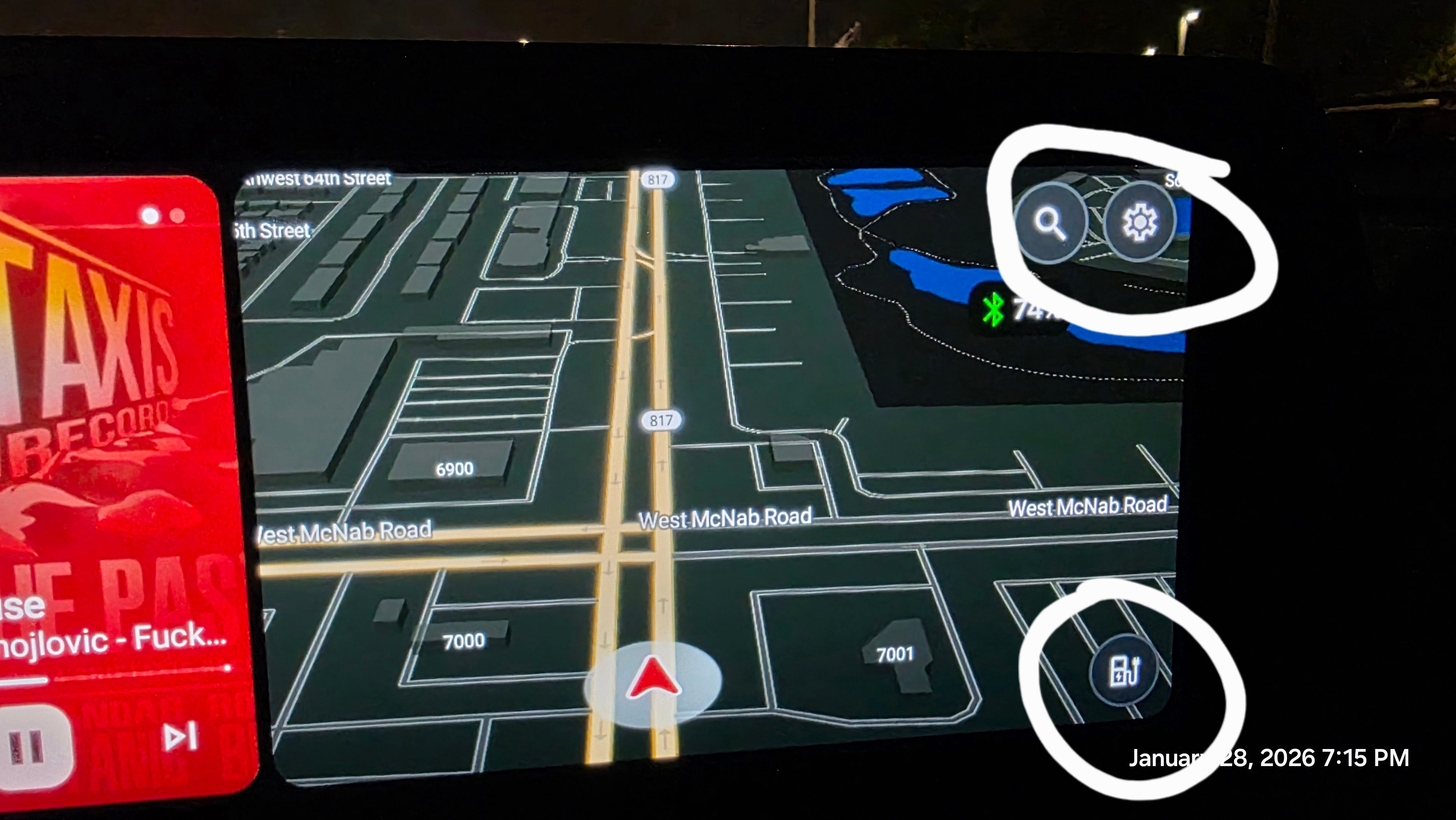
- Where does this happen?
- ABRP version number (found at bottom of settings menu)
Log in to comment and vote
Comments4
Samuel_ABRP
Feb 19
PinnedHey, i just gave it a quick try and I can reproduce it. However this is not specific to ABRP. I tried other apps too, and there the behaviour is exactly the same. I’m afraid this is an issue, you have to file at the Android Auto issue tracker:
https://issuetracker.google.com/issues?q=status:open%20componentid:961448&s=created_time:desc
https://support.google.com/androidauto/community-guide/347802564/how-to-report-an-issue-with-android-auto-and-get-more-help
Bo (ABRP)
Feb 4
We have seen this internally too and will see if we can reproduce and fix it (normally Android Auto is responsible for hiding the buttons after a few seconds). Let us know if you have a reproducible case.
David Teiman
Feb 4
Yes it happens every time the map loads on startup. If I touch somewhere on the map, then it will finally disappear.
Linda ABRP
Jan 30
Hi
Thanks for reporting this. I will add this to our bug meeting that we will have on Wednesday.