E-208 and accuracy
Hello!
I need your help regarding the reliability of ABRP. I use it with an OBD scanner to get accurate data, but ABRP’s estimates are always off.
For example, I arrived at a charging station with 25% battery instead of 33%, and later, I got home with 4% instead of 10%. It’s really not reassuring to not be able to trust it.
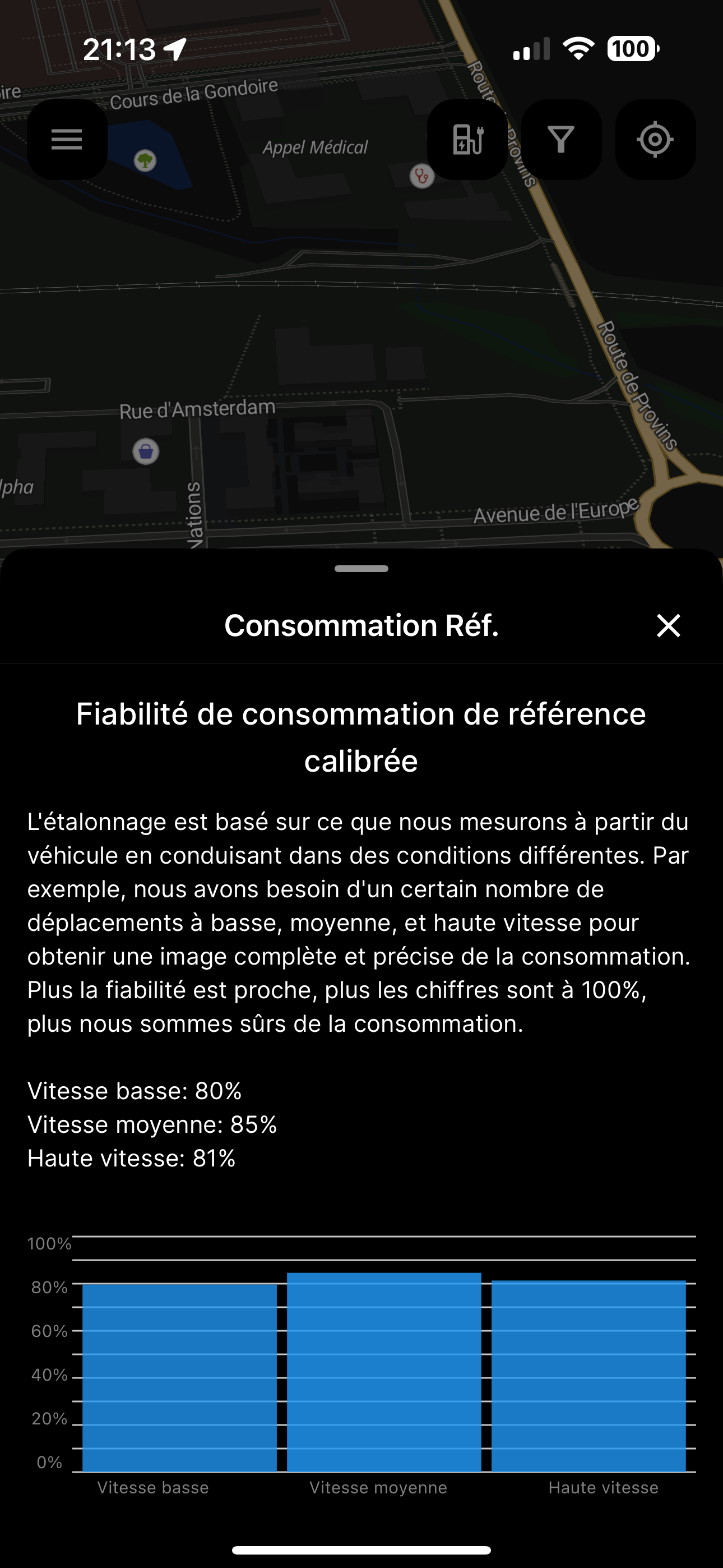
I should mention that I was driving without exceeding speed limits. My reference consumption is not perfectly calibrated, but as you can see, I’m still at 81% efficiency at high speed, so I should already be getting better results than this.
Thanks in advance!
Log in to comment and vote
Comments18
Mar 21, 2025
PinnedHi @ABRP User #1756925,
Your reference consumption is as calibrated as possible, this is roughly how high the confidence % goes.
Please check your settings for ‘speed’, currently you do have ‘adjust speed’ enabled which if possible and helpful, allows ABRP to plan with a decreased speed in exchange for lower consumption and fewer charging stops.
Valentin Marchand
Mar 22, 2025
I just did a 3-hour drive with that option disabled, and I ended up with the same result. The estimated arrival was with 20% battery, but I actually arrived with 14%. I think the app struggles to estimate accurately when driving at 130 km/h, even though that’s the maximum speed I entered in the settings.
Valentin Marchand
Mar 22, 2025
@Katya Skog I’m still experiencing the same issue.
Tonight, the app estimated I would arrive at the charging stop with 34% battery, but I actually arrived with only 26%. Then at my final destination, the estimate was 23%, but I arrived with just 15%. That’s a major gap, and it’s really not reassuring — I simply can’t trust the app’s predictions.
All automatic options are enabled, including OBD-related features. My maximum speed is correctly set to 130 km/h. I’m not sure what else I can adjust on my end.
I understand a small margin of error is to be expected, but this level of inaccuracy is too significant to ignore. In its current state, the app is unfortunately not usable for me, as I can’t rely on its estimations.
Katya S.
Mar 31, 2025
Did you also check the setting for ‘adjust speed’?
Valentin Marchand
Apr 2, 2025
@Katya Skog hello, yes, I tried with this setting enabled and disabled. Once again, it’s a failure. A new route with good weather, an estimated arrival with 31% battery before departure, which even increased to 34% while driving — and I finally arrived with 29%. So that’s below the original prediction, even though I stayed well below the speed limits for a large part of the trip. If I had driven normally the whole way, the difference would have been even greater.
I keep reading that ABRP is usually pessimistic in its predictions, but here it’s completely the opposite. I don’t know what to do anymore. I just can’t rely on it, and that makes the trip really unpleasant.
And it got even worse after my charging stop. The predicted arrival was 16% after I left, it quickly went up to 18%, and I ended up arriving with 9%. That’s a huge difference. At 110 km/h I consumed around 23 kWh/100 km, while the app shows 201 Wh/km.
Could the problem be coming from that? I know it says that this figure is different from what’s shown on the dashboard, but the difference seems massive here.
Katya S.
Apr 4, 2025
Okay, I can see that you’ve now disabled the ‘adjust speed’ setting but I’d like to just reiterate that if this setting is enabled we do expect you to drive below the legal speed limit for one or multiple legs of the route.
There could possibly be some type of confusion when using dual live data sources. Could you check;
That when you start driving the starting SoC matches that of the car
Have you tested if there’s still a discrepancy if you disconnect the Enode connection?
Valentin Marchand
Apr 4, 2025
@Katya Skog The startup SoC is indeed the correct one — and I can actually see the Bluetooth icon. I haven’t tested with Enode disabled yet; I’ll do so as soon as possible.
Valentin Marchand
Apr 5, 2025
@Katya Skog Once again, even after disabling the second connection with Enode and keeping only the OBD connection, I get the same result: 39% predicted at arrival at the charging stop, 31% in reality. The difference is huge — way too much.
And I was driving in very good weather conditions: sunny, over 20°C — theoretically ideal.
I’m really wondering how you’re doing the calculation. Because if the baseline is set to 110 km/h while I’m actually driving at 130, of course it won’t work.
What’s even more surprising is that the system doesn’t seem to truly adapt when I drive at 130 — the estimated battery level only drops slowly, simply because the battery level is catching up with the estimation.
Honestly, I find this quite catastrophic.
Valentin Marchand
Apr 26, 2025
Any help here please? @Bo (ABRP) @Katya Skog @Matt (ABRP)
Bo (ABRP)
Apr 28, 2025
Agree, this precision of SoC prediction is far from what it should be.
I checked your car data and notice that we don’t get any data we can use to estimate your SoH (i.e. battery degradation). Could it be that your e208 is starting to suffer from more degradation than the default 5%?
Valentin Marchand
Apr 28, 2025
@Bo (ABRP) Hi, thanks a lot for your reply!
When I check with the Car Scanner app, I actually do get a SoH value, so I’m not sure why ABRP isn’t picking it up.
Right now, the OBD scanner estimates my SoH at around 92%. It’s not super precise, but it’s definitely better than the 5% that was previously showing.
Thinking about it, I remember seeing SoH data in the app before, probably through the Enode connection I had set up — which I’ve since removed.
At times, the app showed about a 6% degradation without me manually changing anything, but even that was still below the OBD estimate.
Bo (ABRP)
Apr 28, 2025
We should be able to estimate the battery degradation using OBD on the e208, but that requires that we get OBD readings during at least 50 kWh of fast charging.
Valentin Marchand
Apr 28, 2025
@Bo (ABRP) I manually set the degradation to 10% to test. However, when I run a route that I drive regularly to see if the estimation feels more accurate, it still doesn’t match my previous trips — it’s still overestimated.
I’ll test again in real-world conditions this week.
Do you think there might be an issue with the calculation when driving at 130 km/h, or could it be a problem with my car consuming more than normal?
It seems like the estimation is fairly accurate when I stay under 110 km/h, but at 130 km/h my consumption increases a lot, and that’s when the estimation becomes way off.
Just to be clear, I have correctly set 130 km/h as the cruising speed in the app settings.
Bo (ABRP)
Apr 29, 2025
On some vehicles (usually early EVs) the efficiency of the drive train drops a lot at high power use like at high speeds, and we have noticed that this is not always captured by our calibration. My old Tesla Model S with a ski box and headwind will eat battery like crazy when driving at a 130 km/h while behaving nicely at 110 km/h, same thing with a Renault Zoe at > 120 km/h.
Was the ABRP estimation correct for your vehicle at 130 previously?
Valentin Marchand
Apr 29, 2025
@Bo (ABRP) I’m not entirely sure I understand the question correctly, but I’ve never had accurate estimations at 130 km/h when leaving all the app settings on automatic.
There have often been quite significant discrepancies.
What concerns me is that the app doesn’t seem to realize that the estimations are off.
I’m not sure if there are any settings I could tweak manually to improve this.
Valentin Marchand
May 1, 2025
What I’ve noticed is that the reference consumption calibration seems to be struggling.
Even after quite some time, the calibration appears to be stuck around 80%.
The high-speed calibration even seems to be decreasing — for example, I’m currently at 79%, even though I had gone above 80% a few days ago.