CarPlay zooms away during navigation when there is an alternate route
Version 6.0.0 zooms away during navigation when there is an alternate route. However when you drive on one of the alternatives this zoomed away screen remains (during the whole route in most cases) rendering the navigation obsolete.
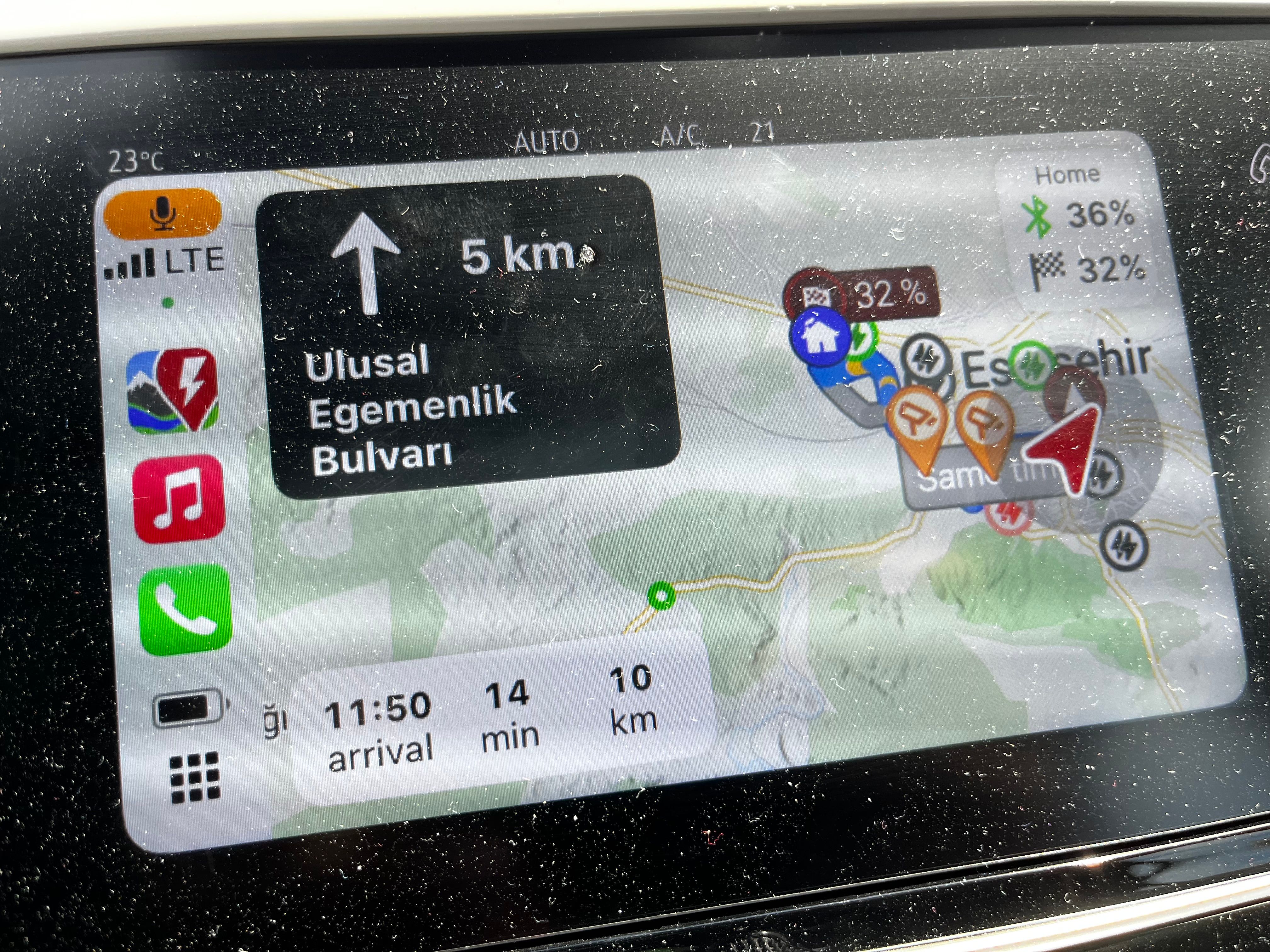
- Where does this happen?
- ABRP version number (found at bottom of settings menu)
Log in to comment and vote
Comments9
Bo (ABRP)
May 12, 2025
Thanks for reporting! Have you tried changing the view mode? Press the map and buttons will appear to the right, press the one which toggles beween “3D” and an icon for next step.
ABRP User #1310143
May 12, 2025
Yes. It SOMETIMES correct the issue but in a few minutes it comes back. Remind you I drive while this happens. We are not looking for shortcuts we report bugs. Are you saying this is normal behavior? There are tens of reports. Do something other than the awaiting clarification BS that we are sick and tired about. Since we can no longer plan or navigate with 6.0.0, I will no longer reply to your clarification waste of time. Instead I will write a new and juicy review on App Store every day. Thanks for nothing.
Bo (ABRP)
May 12, 2025
We depend on our users to reproduce some of the difficult issues we cannot see on our own test setups, that’s why we ask for more information.
Are you driving in “3D” mode when this happens or are you using the “plan overview” mode?
ABRP User #1310143
May 12, 2025
I don’t know what is plan overview. But when I drove on 3D (the button read 3D) it happened. When I hit that button it disappeared but came back a while later. And disappeared again when I hit the same button (which contained a graph and turned into 3D when I hit it) and came back a while later.
Samuel_ABRP
May 12, 2025
Hey,
sorry for the confusion. We just aligned the buttons in Carplay with the latest release to be consistent all over the app and with Android Auto, so we have slightly different icons now.
We also aligned the logic of that map mode toggle button a bit, so that it actually shows the next map mode, you will switch to when clicking, as this is a behaviour that seems to be more common across navigation apps.
So what that means is if the button shows “3D” you will get into 3D mode, when you click the button (meaning you are currently in overview mode, which is the graph icon, which should actually reflect the next leg of the route).
When the graph icon is visible, it means you are in 3D mode and clicking the button you will get into the overview mode.
As the overview mode also zooms in when close to instructions for better oviewiew, it might have looked like you were actually in 3D mode, but weren’t.
Could you please check, if the map behaves as it should, when the next leg icon is visible?
If this behaviour is too confusing, we could also consider reverting it back to the old behaviour. Sorry again and thanks for your time explaining the issue.
ABRP User #1310143
May 12, 2025
Thank you and sorry Samuel. I was frustrated with other issues I reported on 6.0.0 and I thought this was one of them. Now I understand the difference in behavior. I will check the button behavior on a longer leg than I did today and report back if the behavior is as intended.
ABRP User #1310143
May 12, 2025
One minor note: on larger screens the overview mode can be appealing. However on smaller screens like mine it is impossible to decipher the route. This might be another consideration for the future.
ABRP User #1310143
May 13, 2025
I double checked it. It works as intended. Thank you for your assistance.
Samuel_ABRP
May 13, 2025
Hey, thanks for your feedback. We discussed the map mode button internally also and we will try to make more clear, what it actually means.