Cannot get live data from ABRP Webserver for new configured car models in the ABRP app
🚧 THIS IS A TICKET MIGRATED FROM UPVOTY. The original ticket and comments will be available for a limited time over at:
https://abrp.upvoty.com/b/report-a-bug/linking-obd-to-new-car-models-not-possible/
———————————————————————————
Based on Katya's recommendation
https://forum.abetterrouteplanner.com/topic/3682-live-data-values-are-no-longer-being-updated-although-torque-pro-status-is-connected/#comment-12969
i'm creating a bug report here at Upvoty.
Three weeks ago I've got the new battery with higher capacity for my Opel Ampera-e. 🤩
ABRP works still with the same TorquePro Upload and the driver model named Ampera-e (upload path …/ampera60).
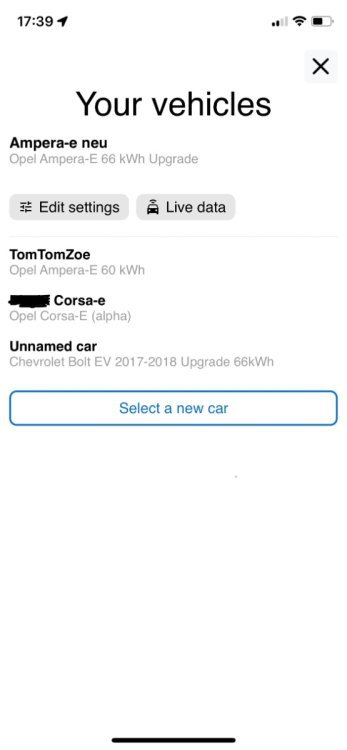
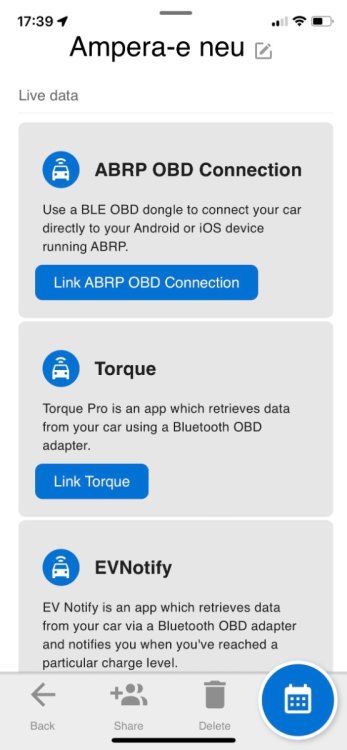
Due to there‘s a better driving model for the battery upgraded cars, I’ve set up a new car in my profile: A „Opel Ampera-e with 66kWh Upgrade“. I clicked through the instruction to configure Torque Pro and saw that the upload path is not …/ampera66 like I thought but …/torque.
I configured TorquePro with the new password and the new upload path ../torque and it seems that Torque Pro can upload data successfully (there‘s no data waiting for upload), but the ABRP App (V4.2.12 (1157)) still shows no green Livedata Icon and no live data at all. Beneath “Edit settings” ABRP shows “Live data”. When I click on the Live data button, the instructions to configure live data appear again, even I‘ve gone through these steps already. 🤔
For testing I also tried to setup new cars based on the Bolt EV 66kWh and Bolt EV 60kWh, followed the instructions how to setup live data with TorquePro, but both configurations with their individual password also won‘t show me any live data in the ABRP App. Although the upload seems to work for these cars too. 🙃
(I want to stay using TorquePro if possible, to be able to see also battery cell voltage and temperatures, so OBD BLE direct with ABRP is no real option for me at the moment 😉)
The formerly used Ampera60 configuration is still working with the new battery, but I think it would be better for correct planning to use a car configuration with the 66kWh ABRP driving model? The charging curve is also modified by GM.
What do you think about it?
Did I made something wrong while configuring a new car with live data?
Is the upload path http://api.iternio.com/1/tlm/torque the correct one, so meanwhile it's independent of car model? (In the past the GM Bolt had ../tlm/bolt60 and the Opel Ampera-e ../tlm/ampera60 as upload path to the ABRP Webserver).
Can someone have a look into my account, please?
Status: Completed
Log in to comment and vote
No comments yet
Be the first to share your thoughts.