Bad trip registration
Bad power and distance on logs.
First picture is a register of trip and second is a plan using ABRP.
Plan is ok in distance and power but log have big errors on data registrated.
Log of my trip today with really bad speed (211 and 322 km/h !!)
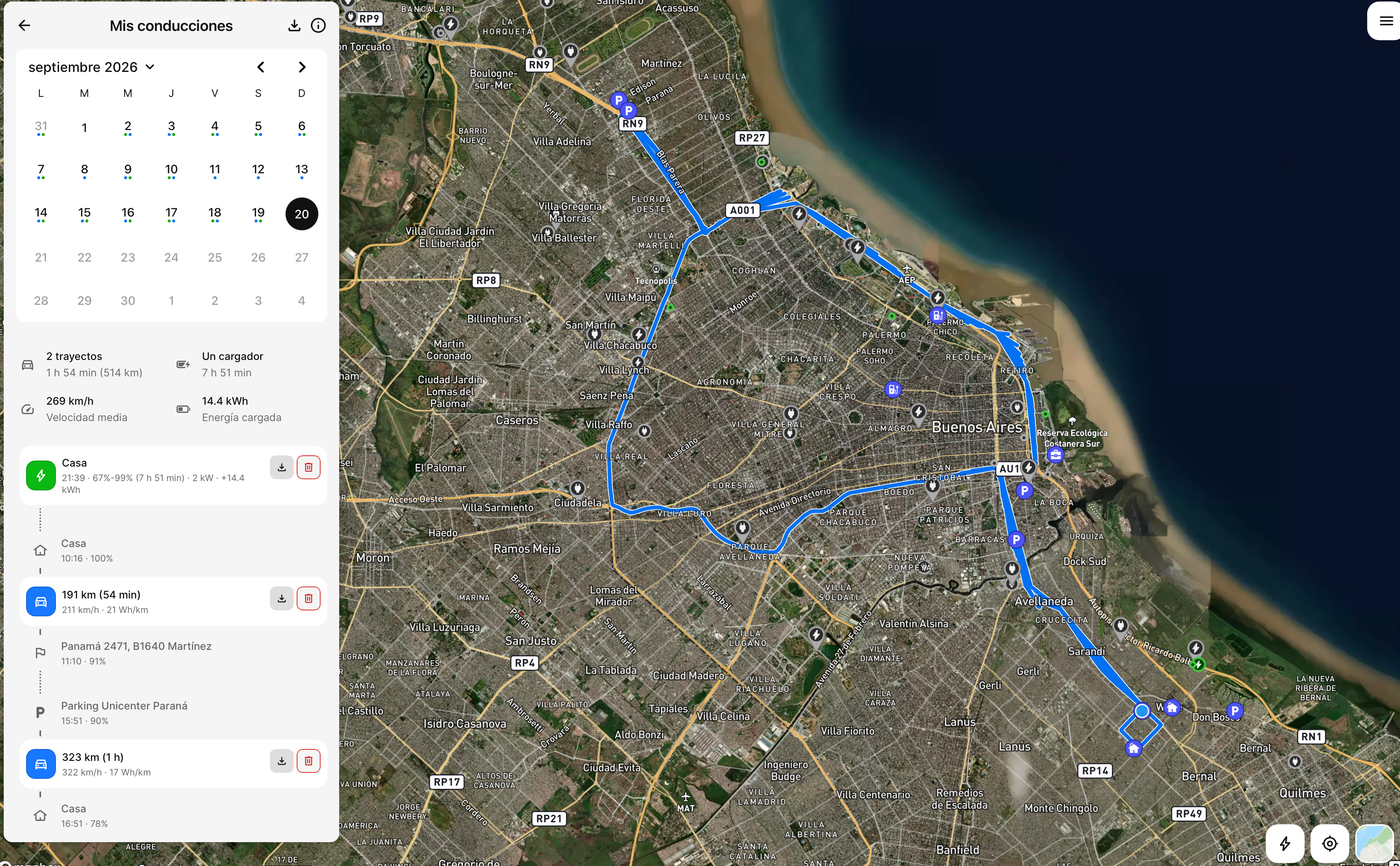
Planification of same trip. 42 and 33 km is ok. Log show error, 191 and 323 km.

Distance in log have serious error in speed, distance and power used.
- Where does this happen?
- ABRP version number (found at bottom of settings menu)
Log in to comment and vote
Comments17
Mahde - ABRP
Sep 21
Hello @ABRP User #2314454,
We can see that you get live data from a third-party provider and we are not sure from where. Could you specify from us where this live data is coming from and what you are using to get live data?
ABRP User #2314454
Sep 21
Hi @Mahde - ABRP
I’m using Home Assistant on my personal server with BYD integrations over a secondary account (borrow account) to take data from EV Car.
Sending data to ABRP using Iternio API with a key generated for this task.
Best.
ABRP User #2314454
Sep 21
Hi @Mahde - ABRP
For now for best calculations i’m using calibrated max speed from ABRP, 93 km/h, speed coefficient at 100% and manual power consumption scaled at 110 km/h using car historical reference as baseline. Car reference is 13.1 Kw/h. 148 Wh/km is my manual value scaled to 110 km/h.
Mahde - ABRP
Sep 22
The issue is that we see more activity in some places that caused the long distance and possibly the high speed but it was not visible in the telemetry data we found for your drive. Since you are using a third-party data source, we are not able to make any changes ourselves to this and you will have to check with Home Assistant themselves about any server errors that may have caused these numbers.
ABRP User #2314454
Sep 22
Hi @Mahde - ABRP
Now I using triggers to send data to ABRP API in replace of timers.
I think according to your comment my automations on Home Assistant has sending to much data without real changes.
I will try for few days with this change in my third-party system.
Best.
Mahde - ABRP
Sep 22
Let us know the results you receive in the upcoming days!
ABRP User #2314454
Sep 24
Hi @Mahde - ABRP
Things aren't going well so far. I tested sending data in two different ways. First, I tried triggering events based on changes in state of charge (SoC), location, and battery level, but the log data was terrible—it showed way too many kilometers and an unrealistically low energy consumption. Then, I tried using a time pattern set to every 30 seconds, but I got the same results. Next, I'm going to try a time pattern set to every 1 minute to send data to ABRP. As shown in the image below, my actual trip was 21 km with an average consumption of 131 Wh/km. Time is ok.
Mahde - ABRP
Sep 24
Was it the same route that you took as last time? Can you send us the map of this trip you made? We want to compare it to the last one that had a lot of unrealistic patterns.
It seems that you will need to try different methods of getting data that you notice give better and more accurate data since we cannot change anything ourselves when you have API connection to Home Assistant.
ABRP User #2314454
Sep 24
Hi @Mahde - ABRP
Right now, I am trying to replicate a 10 km driving segment exactly. I achieved more realistic distance and consumption patterns using a 60-second time interval. I am now going to test the same route using a 30-second time interval.
I don't intend for you to change anything on your end. I just want to understand the best way to send data so that ABRP can process it and obtain more realistic figures—allowing for greater accuracy in route planning and charging times when using Home Assistant to send data to the ABRP API.
This is just my personal experiment to understand and learn the best method and way to send data to ABRP.
Best!
ABRP User #2314454
Sep 24
I attempted two trips with identical routes and durations. Because they were close in time, ABRP treated them as one and didn’t display separate data.
ABRP User #2314454
Sep 25
Hi @Mahde - ABRP
Based on my tests over two days and ten trips, I have observed that sending readings every 60 seconds results in accurate trip logs regarding distance and consumption. However, when data is sent every 15 or 30 seconds, errors occur: the system records more distance than actually traveled, reports unrealistically low consumption figures, and shows inflated speeds. The best approach so far is to poll data from the BYD vehicle every 30 seconds (the minimum polling interval) and send it to the ABRP API every 60 seconds. For my setup, I use the BYD integration from the HACS repository within Home Assistant. Personally, I run this in a Docker container on a home server running macOS. My connection is a symmetrical 2 Gbps fiber-optic link, so I can rule out any connectivity or server-related issues.
ABRP User #2314454
Sep 25
Hi @Mahde - ABRP @Bo (ABRP)
I have now managed to obtain consistent and accurate data readings. The issue lies in sending duplicate battery, speed, and SoC data to ABRP. By sending data only when these variables actually change, the trip log remains accurate—specifically when using data transmitted via Home Assistant and the system's BYD integration. Data must be fetched from the BYD cloud using a 30-second polling interval (the minimum possible) and sent to ABRP only if SoC, battery status, speed, latitude, longitude, heading, or battery power changes—and even then, only every 60 seconds, specifically at the 30-second mark of each minute. With this data acquisition and transmission structure, the trip values recorded in ABRP are correct.
Best!
ABRP User #2314454
Sep 25
@Mahde - ABRP @Bo (ABRP)
Mahde - ABRP
Sep 28
Thank you for reporting these tests to us! It helps us understand Home Assistant and the time intervals much better in order to understand other users that could have other issues too! Is there anything else you need help with in ABRP that you may have come across while making the tests?
ABRP User #2314454
Oct 28
Hi @Mahde - ABRP
To obtain high-quality data, the automation in Home Assistant—which sends data to ABRP—is configured to trigger only when there is a change in specific variables. These variables are retrieved via the BYD integration (from the HACS repository), which is set up to pull data from the BYD cloud using a loaner/test account configured within the BYD mobile app.
The only variables that trigger a data transmission to the Iternio API when their values change are the vehicle's battery level and its odometer reading. By sending data only when these specific values change, the calculated energy consumption aligns with real-world figures; consequently, the records in ABRP provide accurate consumption data, enabling precise calculations for routes and charging stops. Best regards.
Linked to Wrong driving history, consumption, speed due to wrong timestamp, missing data