Apple CarPlay shows wrong map location (Lund, SE) in Tiled View
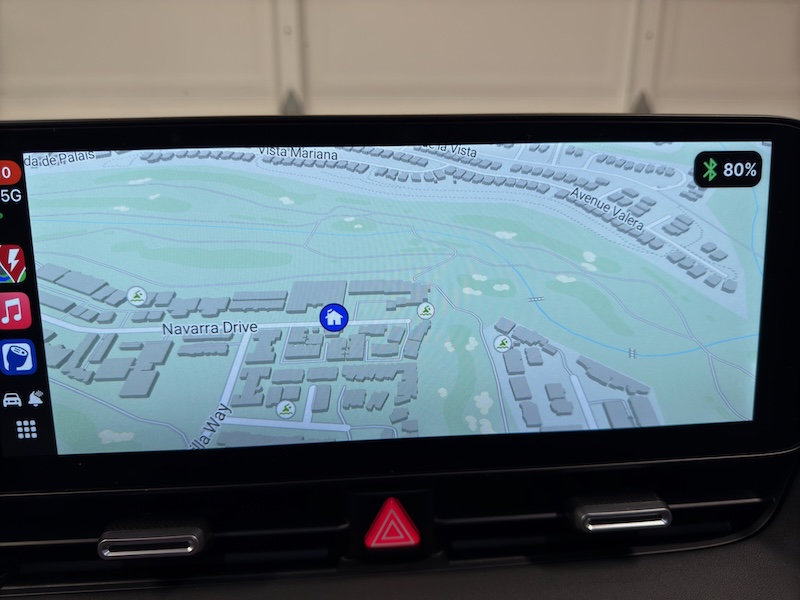
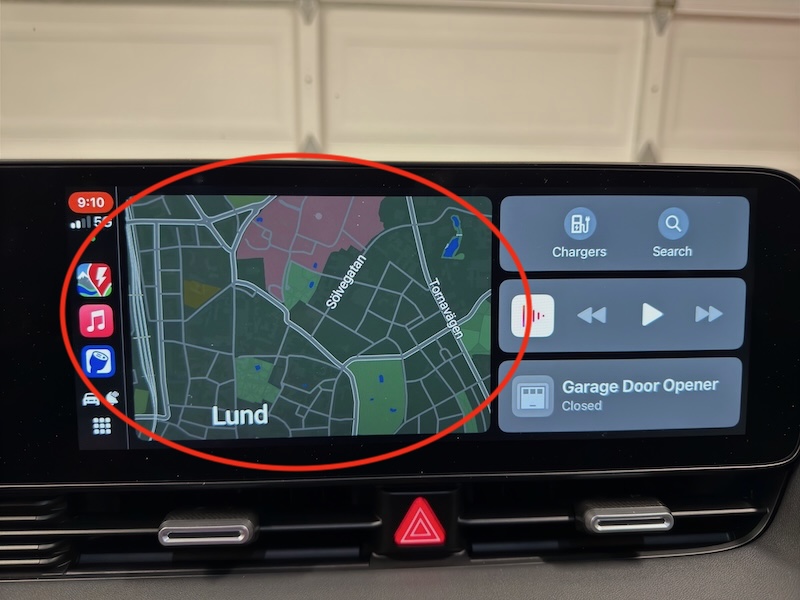
ABRP Map shows correctly in full screen view within CarPlay. When I switch within CarPlay to the Tiled View, ABRP shows a static map of Lund that is has no touch controls, which of course is not right when I’m in Southern California, USA. ;) Photos of both situations, taken one after the other are attached.
Running iOS 18.2.1, ABRP 5.6.2, on a 2025 Hyundai IONIC 5
- Where does this happen?
Log in to comment and vote
Comments4
Bo (ABRP)
Jan 28, 2025
Thanks for reporting! So the dashboard view does not update or follow the car or plan at all?
Bert Leithold
Jan 28, 2025
ABRP follows my car via GPS, a plan, and functions normally only when in CarPlay “full screen” view (see photo #1).
When I then put CarPlay into “tiled view” (see photo #2), which is reached by using CarPlay’s lower left screen control, ABRP presents a map of Lund, Sweden, which does not move and I cannot interact with. Apple Maps and all other mapping applications show a smaller version of their “full screen” view which is fully interactive. ABRP should as well.
I am now running iOS 18.3. ABRP has the same problem as previous iOS release I reported earlier.
Thanks.
Bert Leithold
Jan 28, 2025
PLEASE CLOSE THIS PROBLEM.
It is no longer a problem for me. Both CarPlay views now operate correctly with ABRP.
Solution: I force quit the iOS ABRP app, then rebooted my iPhone. The next time I got in my car, all was good again.
Bert Leithold
Jan 27, 2025
I simply won’t use the CarPlay version of ABRP without access via the tiled view, as that allows display and access to other apps such as Media simultaneously.