Link ABRP to BMW account
So I installed ABRP app and activated the premium subscription today.
Now I want to link ABRP with my car to have live data and optimal travel experience for charging.
However when I try to link via Enode and go through the steps I keep getting stuck on the part where you have to "Sign in to your BMW account - Sign in using your My BMW account details to connect your vehicle to ABetterRouteplanner."
After I put in correct credentials it keeps referencing "Agreement required".
As you can see below.
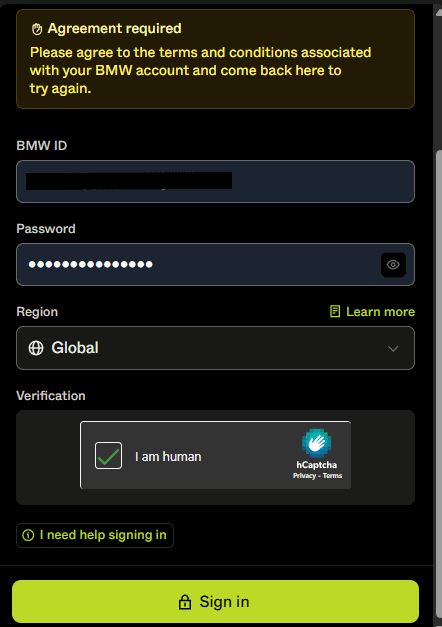
I however to not get any popup do accept some agreement. I have tried this on a PC and on my smartphone, no difference.
I tried a different region (there is only Global or North America and I am in Europe).
I logged in to MyBMW account and validated all possible options related to End User agreements are approved.
I checked BMW ConnectedDrive is active. I validated any privacy settings that might be an issue but have not found any.
Any advice?
Log in to comment and vote
Comments1
Linda ABRP
Aug 4, 2025
Hi
Have you agreed to the terms and conditions in your BMW account?