Enode connect for Ioniq 5: COnnection Problem error
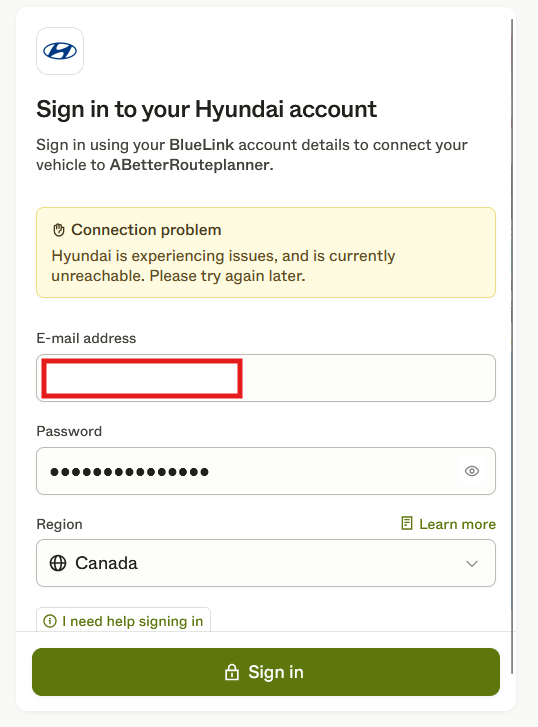
Trying to connect ABRP premium to Enode for my Ioniq 5 (Canada). At Bluelink sign in page, see picture for error that happens after entering credentials. Same issue happens on web browser and on mobile app.
Log in to comment and vote
Comments5
Linda ABRP
May 14, 2025
Hi
Can you please try these things:
Is the user absolutely sure they are entering the appropriate credentials for Hyundai? Have they confirmed that the same credentials work directly with the Hyundai OEM app and can they see everything about the vehicle as normal in the OEM app?
Has the user checked if there are any specific terms and conditions or anything that needs completion directly in their Hyundai account?
Is the user potentially trying to access an account from a different region than they are physically located in?
ABRP User #1234130
May 14, 2025
Hi Linda.
For #1, I used the same password in the Bluelink app stored in Google password managers, so I know it works in Bluelink. I can see range and other vehicle information in Bluelink as per normal.
#2: I don't see anything on the Hyundai side the needs to be allowed
#3: I am using the Canada region and am located in Canada
Linda ABRP
May 15, 2025
Ok. I will make a report to Enode.
Linda ABRP
May 20, 2025
Hi
This problem is fixed now. Please try to connect again.
ABRP User #1234130
May 21, 2025
It worked, thank you!