Brand logo of car incorrect
I added my car (Citroen e-SpaceTourer) to ABRP Pro and it featured the brand logo of the manufacturer (i. e. the Citroen logo).
Than I added the car of my son, which is a Dacia, as a second car. In the selection list, the correct Dacia Logo was presented.
But when I started to plan the next trip with my first car, the Citroen, it also shows the Dacia Logo, which is irritating.
See the following screenshot.
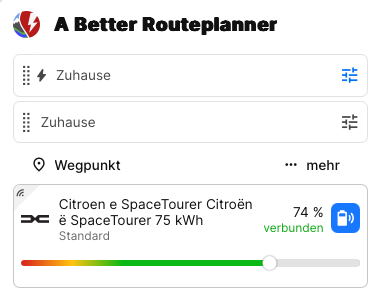
BTW: Is there a chance, to edit the “name” of the car and its logo? Consider, you have more than one identical car to manage. How could you tell those cars apart, if are all of the same manufacturer and type?
Log in to comment and vote
Comments2
Thomas
Nov 15, 2024
Try this:
Select your car with the wrong logo
Click ‘Edit settings’
Click on the ‘Car model’ area
Select your Citroen vehicle model from the list
When corrected with right logo: You can edit the name description by clicking on the pen (yellow marked in the upper right corner)
Jan Braun
Nov 16, 2024
@Thomas thank you very much.
This changed the logo back to the correct brand.